Editorial review — updated 10 October 2026. Running a forex trading bot through the night sounds simple until your home connection drops, your laptop restarts, or a power cut stops MetaTrader. A virtual private server (VPS) addresses one part of that problem: it keeps the trading terminal running on a remote machine rather than relying on your personal computer. Exness offers eligible clients a VPS service without a separate hosting charge, but qualification and continued access are conditional.
This guide explains what the Exness Free VPS actually does, how to verify the requirements shown for your account, and how to configure MT4 or MT5 Expert Advisors (EAs) responsibly. The critical distinction is between keeping a program online and making a strategy successful. A VPS can assist with the former; it cannot promise the latter.
What is a forex VPS, and why use one?
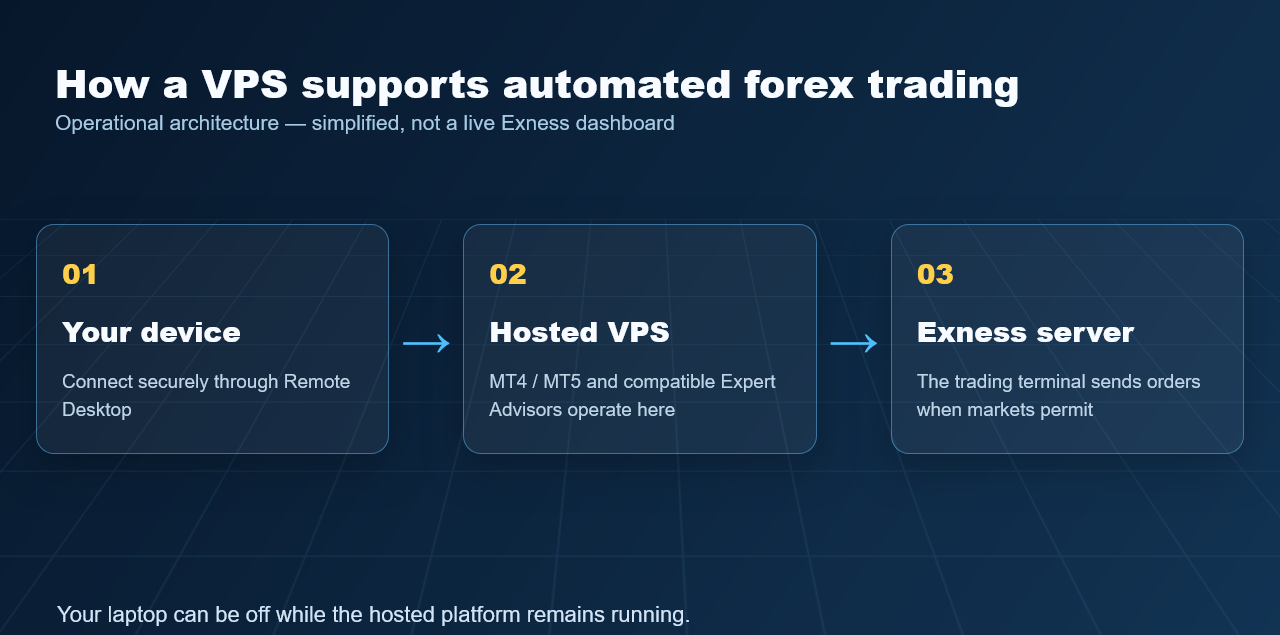
A VPS is an isolated virtual computer hosted in a data centre and reached over a remote desktop connection. Instead of running MetaTrader only on a machine at home, traders can leave MetaTrader and compatible EAs active on the hosted Windows environment. The remote system continues functioning when their own desktop is switched off or disconnected, provided the hosting service and trading terminal remain operational.
Exness says its VPS infrastructure is situated near its MetaTrader trading servers. The potential benefit is a more consistent network route between a trading terminal and a broker server. That can matter when an EA depends on timely order submissions or continuous monitoring. However, geographic proximity is not a guaranteed execution time: market liquidity, symbol specifications, server conditions, and the design of the EA still influence results.
What traders gain—and what they do not
- Continuity: automated strategies need not depend on the trader leaving a personal PC powered on.
- Connection stability: problems with the trader’s home internet need not interrupt an EA already running remotely.
- Remote access: a trader can check the hosted terminal from another compatible device.
- No separate VPS hosting bill for qualifying users: the infrastructure is provided subject to Exness requirements.
None of those features removes slippage, abnormal spreads, gaps, technical failures, or losses caused by unsuitable trading logic. “24/7” describes the ability to keep software running; it does not mean forex markets trade continuously through weekends or that every instrument is always open.
Exness Free VPS requirements in 2026
There is no single publicly verified universal deposit figure that every applicant can rely on. Exness’s October 2026 setup guidance instructs traders to sign in to their Personal Area and inspect the Virtual Private Server section, where their applicable account-balance and/or trading-volume requirements appear. These may vary by account. Existing qualifying funds may satisfy the balance criterion without a new deposit; other clients may need to meet a combination of balance and completed trading activity.
To check, open your Exness Personal Area, look for Exness benefits → Virtual Private Server (or the VPS section under Settings, depending on interface), and review both initial eligibility and retention criteria. Do not interpret a headline such as “free VPS” as a promise that a newly opened, unfunded account will immediately qualify.
Trading volume is not the same as profit
Trading-volume criteria concern qualifying activity, not whether the trades earned money. Exness calculates eligible activity from executed orders and sets the applicable volume amount in the Personal Area. Social Trading and Portfolio Management accounts are excluded from the specific VPS volume calculation described in its setup guide. This is a crucial distinction for traders managing multiple accounts or following other strategies.
It is rarely rational to increase leverage or place unnecessary trades just to reach a hosting threshold. Spreads, commissions, swap charges, and the possibility of market losses can easily exceed the price of an independently purchased VPS. Assess the total economic cost before changing a trading plan.
How you keep access after qualifying
Eligibility does not end on the day hosting is granted. Exness describes ongoing qualifying trading-volume tests across 30-, 90-, or 180-day periods; the exact amount for your account must be confirmed in the Personal Area. In addition, you need to log in and trade with the VPS-linked trading account within five days of receiving VPS access. Exness also requires you to log in and trade from the VPS at least once every 30 days; pending orders do not satisfy that activity requirement. Failing retention criteria may lead to termination and deletion of data stored on the VPS.
For an occasional manual trader, these ongoing conditions may be more important than the initial qualification threshold. A VPS can be technically useful yet economically unsuitable if the trader would not otherwise generate the required activity.
Exness VPS specifications and practical capacity
Exness’s public VPS page lists Windows Server 2019 (64-bit), two CPU cores, 2 GB of RAM, and 50 GB of disk space. Those published specifications are adequate context for assessing a comparatively lightweight terminal setup; they are not a promise that any number of heavy EAs, backtests, or data-hungry strategies will perform smoothly.
Step-by-step: how to request and activate Exness Free VPS
- Confirm your account eligibility. Sign in to the Personal Area and open the VPS benefits/settings section. Check the precise balance and volume conditions shown there.
- Meet the requirements without forcing trades. If your existing balance and legitimate trading history qualify, continue. Otherwise consider whether the service is worth the cost and risk of additional activity.
- Request hosting. Once eligible, select Request VPS hosting in the Virtual Private Server section.
- Retrieve the connection details. Once the VPS status displays Online, choose Login to obtain its address, username, and password. Protect these credentials; the password may be shown only once.
- Connect remotely. On Windows, use Remote Desktop Connection or a supported equivalent. On a Mac, use an appropriate remote desktop client and enter the same VPS credentials.
- Secure and inspect the machine. Change the initially supplied password, confirm MetaTrader can connect to the intended trading account, and verify the correct trading server.
The exact menu labels can change with updates to Exness’s Personal Area. If the controls differ, follow the current official VPS setup guide rather than an old screenshot or a third-party activation trick.
How to run MT4 and MT5 Expert Advisors on the VPS
The broker provides MetaTrader terminal software in the hosted environment. Once connected by remote desktop, first launch the platform, select the intended trading account, and verify that live quotes are updating. For a custom EA in MT4, choose File → Open Data Folder, place the EA in the appropriate MQL4/Experts folder, then restart or refresh MetaTrader. In MT5, follow the comparable process inside MQL5/Experts.
Open the Navigator panel, attach the EA to the intended chart, review its input parameters, and enable the relevant automated/algo-trading permission. Confirm the chart symbol, timeframe, position sizing, trade permissions, and any required indicators before allowing live orders. A successfully attached EA is not necessarily a correctly configured EA: inspect the Experts and Journal logs for errors.
Practical example: suppose an EUR/USD EA places orders only during the London session. After testing it on a demo account, a trader installs it on the VPS, checks that the terminal remains connected, confirms the EA’s time-zone and session settings, and sets risk limits. The trader disconnects their own laptop but periodically reconnects to inspect logs and positions. The bot may continue operating remotely, yet trades can still lose money and must be supervised.
Remote access should not be confused with simply minimising the MetaTrader window. Verify the terminal continues running after your remote desktop session disconnects. Never share VPS credentials with strangers or install untrusted trading bots. Exness warns that credential sharing may violate its VPS terms.
Free broker VPS vs paid third-party VPS
| Factor | Exness Free VPS | Independent paid VPS |
|---|---|---|
| Cost | No separate hosting charge while eligible | Monthly/annual hosting cost |
| Qualification | Account balance, activity, and retention conditions apply | Generally governed by subscription payment and provider rules |
| Infrastructure | Designed for trading with Exness servers | Location and resource package depend on provider |
| Flexibility | Exness terms restrict use to its trading environment | May suit multiple brokers or general applications, subject to provider policy |
| Continuity | Possible termination after eligibility lapses | Usually continues while subscribed and compliant |
For a trader already meeting Exness’s conditions, its VPS may be a convenient option. For someone operating across multiple brokers, trading infrequently, or running computationally demanding algorithms, a paid host with transparent resources may offer more control. See also our HFM VPS offer overview for an example of a different broker’s qualification model—not a like-for-like performance benchmark.
Limitations, security, and reasons for caution
Exness’s VPS terms make the user responsible for correct MT terminal and EA operation. A broker-hosted service does not mean the broker monitors whether your strategy is profitable, whether an EA silently stopped, or whether your terminal settings are safe. Maintenance or outages remain possible; Exness also reserves certain rights to suspend hosting and clear VPS data when conditions are breached or access ends.
Use a unique password and store backups off-server. Be particularly careful with reinstallation: Exness states that reinstalling the hosted environment removes its data. The VPS should be treated as a dedicated trading environment, not a general-purpose Windows cloud computer. According to the broker’s published terms, its service is for trading with Exness servers.
Frequently asked questions
Is Exness VPS really free in 2026?
Exness advertises a free VPS for clients who meet its balance and/or trading-volume conditions. There is no separate hosting price for qualifying access, but maintaining eligibility requires activity and compliance with the service terms.
What is the minimum deposit for Exness Free VPS?
There is no universal minimum figure verified on the current public VPS page. Your Exness Personal Area displays the amount or combination of balance and volume that applies to you.
Can I run an MT4 or MT5 trading bot all day?
Yes, an appropriately configured EA can continue running on the hosted terminal while your personal computer is off, subject to service and trading-platform availability. Always monitor it and remember that markets have closed periods.
Will my EA keep trading if my internet disconnects?
If it is operating on the VPS and the hosted terminal maintains its connection, a failure of your personal internet connection should not by itself stop the EA. VPS and broker-side failures remain possible.
Can I use Exness VPS to trade with other brokers?
Exness’s VPS Terms of Use state that its VPS should be used only for trading with Exness servers. Traders who need broader multi-broker flexibility should assess an independent host.
What happens if I no longer meet trading requirements?
Exness may terminate the service, and VPS data may be erased. The current help guide sets out activity requirements within five days of access and at least once every 30 days, in addition to the relevant volume tests.
Official references and disclosure
Official references checked 10 October 2026: Exness VPS product page; VPS setup and eligibility; VPS Terms of Use; MetaTrader limits.
Affiliate disclosure: This guide may contain affiliate links. If you register through our Exness referral link, we may earn a commission at no additional cost to you. Eligibility and the broker’s actual conditions remain unchanged by our review. Risk warning: Forex and CFD trading involves a substantial risk of loss; automated trading and VPS hosting do not protect capital or guarantee returns.